内容纲要
概要描述
本文主要介绍 如何配置使用https登录webui(仅TDH环境)。
TDDMS: tddms-2.3.5-final
旧版本tddms可以参考wiki TDDMS Webserver弱密码问题解决方案 进行操作
详细说明
1. TDDMS组件,修改参数 restful.https.enable,默认http,改成https
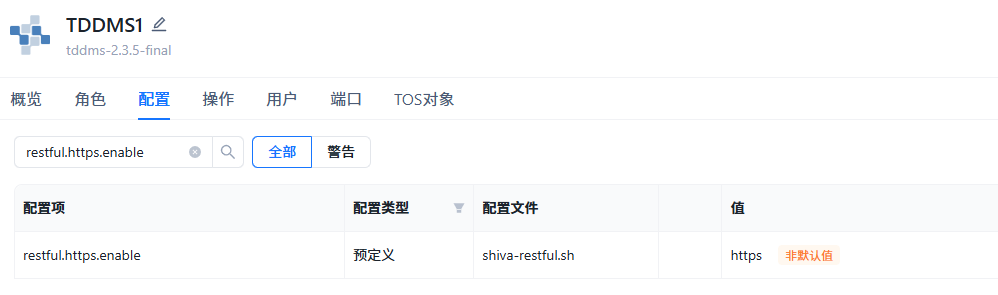
配置服务,重启TDDMS
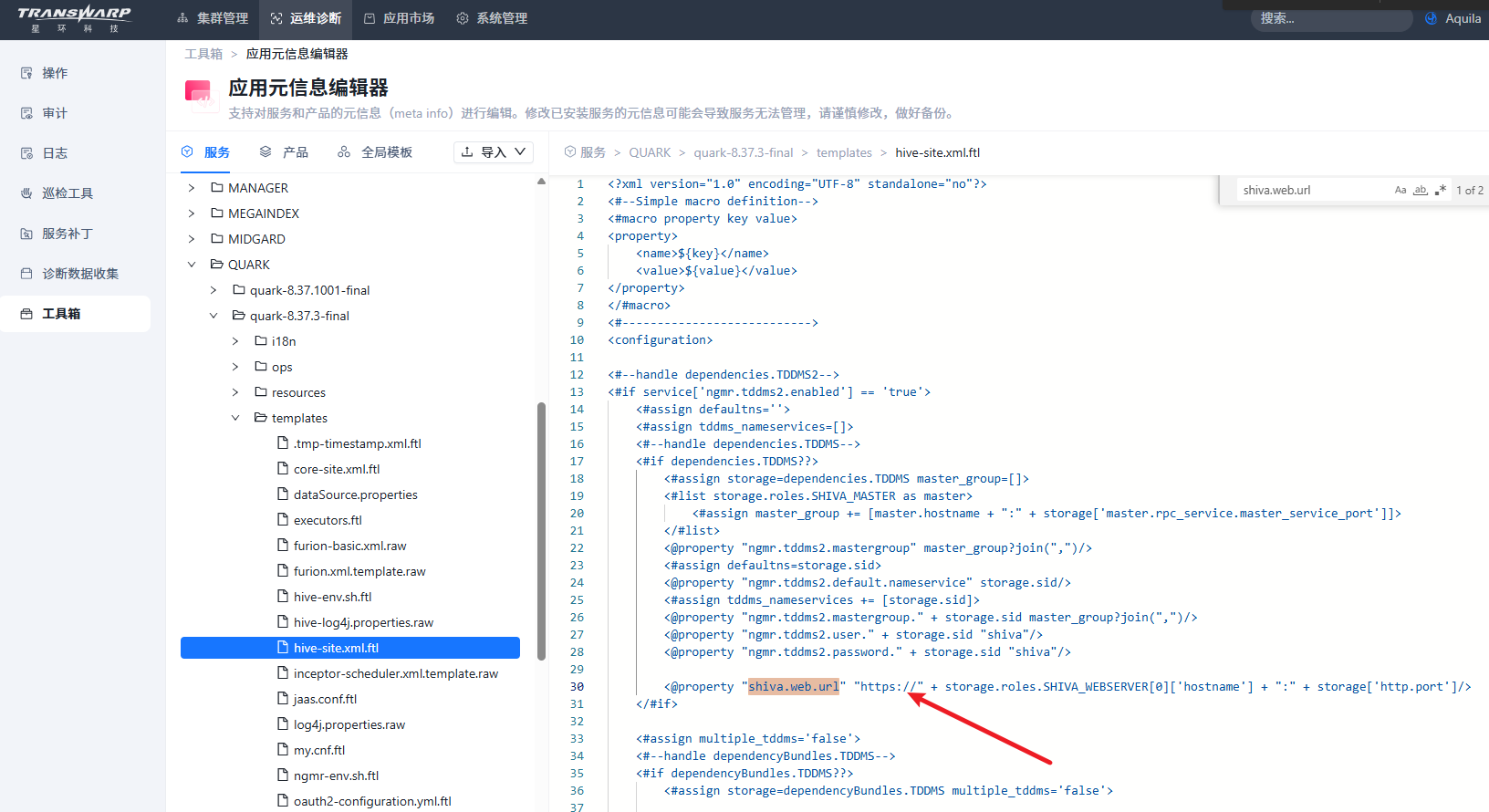
2. Quark/Slipstream组件,修改模板文件hive-site.xml.ftl
shiva.web.url部分,修改成https。 然后 配置服务,重启。
3. DBAService组件,配置服务,重启
如果不做该操作,dbaservice组件仍然会有请求以http的方式连接webserver
FAQ
1. 开启了https后,curl命令建议加上 -k
root@kv1/var/log/dbaservice1]# curl -k -ushiva:shiva -XGET "https://172.18.131.171:4567/config?pretty"否则会返回证书相关错误
root@kv1/var/log/dbaservice1]# curl  -v -ushiva:shiva -XGET "https://172.18.131.171:4567/config?pretty"
* About to connect() to 172.18.131.171 port 4567 (#0)
*   Trying 172.18.131.171...
* Connected to 172.18.131.171 (172.18.131.171) port 4567 (#0)
* Initializing NSS with certpath: sql:/etc/pki/nssdb
*   CAfile: /etc/pki/tls/certs/ca-bundle.crt
  CApath: none
* Server certificate:
*   subject: CN=tddms,OU=transwarp,O=transwarp,L=Beijing,ST=Beijing,C=CN
*   start date: 8月 01 08:15:27 2024 GMT
*   expire date: 7月 08 08:15:27 2124 GMT
*   common name: tddms
*   issuer: CN=tddms,OU=transwarp,O=transwarp,L=Beijing,ST=Beijing,C=CN
* NSS error -8172 (SEC_ERROR_UNTRUSTED_ISSUER)
* Peer's certificate issuer has been marked as not trusted by the user.
* Closing connection 0
curl: (60) Peer's certificate issuer has been marked as not trusted by the user.
More details here: http://curl.haxx.se/docs/sslcerts.html

curl performs SSL certificate verification by default, using a "bundle"
 of Certificate Authority (CA) public keys (CA certs). If the default
 bundle file isn't adequate, you can specify an alternate file
 using the --cacert option.
If this HTTPS server uses a certificate signed by a CA represented in
 the bundle, the certificate verification probably failed due to a
 problem with the certificate (it might be expired, or the name might
 not match the domain name in the URL).
If you'd like to turn off curl's verification of the certificate, use
 the -k (or --insecure) option.