概要描述
本文主要介绍,holodesk表在做了 DROP 误删操作之后,如何恢复,仅供参考。
一般来说,holodesk表的自动清理策略,每1小时清理7天之前的回收站文件:
CLEAN_TRASH_TIME_PERIOD_S:数值类型,表示清理回收站定时任务触发周期,单位为秒,最小配置600,默认值3600s,也就是1小时;
TABLE_KEEP_IN_TRASH_TIME_S:数值类型,表示处于回收站中表的最小保留时间,单位为秒,最小配置600,默认值604800s,也就是7天;
5.x arogdb参数为TDDMS的:
shiva.master.scheduler.clean_trash_period_s 是每隔多久检测一次
shiva.master.scheduler.keep_trash_time_s 是回收站文件保留期限
注意:
truncate / drop table … purge 操作不会进入回收站,无法找回
解决方案
测试环境:Argodb 6.0.7
1.创建样例表,并插入数据
drop table if exists single_rowkey;
create table single_rowkey (c0 int, c1 int)
partitioned by (c2 int)
stored as holodesk
tblproperties ('holodesk.rowkey'='c0');

set hive.exec.dynamic.partition=true;
alter table single_rowkey add partition (c2 = 1);
alter table single_rowkey add partition (c2 = 2);
insert into single_rowkey partition (c2 = 2) values (1,1);
insert into single_rowkey partition (c2 = 2) values (2,2);
insert into single_rowkey partition (c2 = 1) values (1,2);
2. 将表DROP掉
DROP TABLE IF EXISTS single_rowkey;3. 记录表的table id和table name
到 TDDMS Webserver-库表-Trash页面,根据 Table Name搜到对应的表。记下来,step4 会用到。
TABLE id : 43e7c939164749deb2bc93f4adfe171b
TABLE name : lkw.single_rowkey_b41a90dc-500b-44f7-b9ed-2e8bf176dd97
4. 挪出回收站 restore trash
通过 shiva web 的recover table 按钮 将表挪出回收站

此时仅在shiva中恢复了表,但是metastore中并不感知表已经恢复了,需要执行下面的sql语句来映射好meta信息。
5. 创建待恢复的表
--使用原始的建表语句重建表
--注意!如果不知道TBLPROPERTIES如何取舍/填写的话,可以手动建一张其他名字的出来,show create table 参考建表语句改写
CREATE TABLE single_rowkey(
  c0 int DEFAULT NULL,
  c1 int DEFAULT NULL
)
PARTITIONED BY (
  c2 int)
CLUSTERED BY (
  c0)
INTO 29 BUCKETS
ROW FORMAT SERDE
  'io.transwarp.inceptor.memstore2.LazySimpleSerDeWrapper'
STORED BY
  'io.transwarp.inceptor.memstore2.HolodeskStorageHandler'
WITH SERDEPROPERTIES (
  'serialization.format'='1')
TBLPROPERTIES (
  'columnar.store'='true',
  'holodesk.storage.format'='performance',
  'tddms.nameservice'='tddms1',
  'holodesk.databasename'='lkw',
  'holodesk.tablename'='single_rowkey_b41a90dc-500b-44f7-b9ed-2e8bf176dd97',
  'holodesk.columns.mapping'='{"c0":"c0","c1":"c1"}',
  'holodesk.rowkey.unique.scope'='section',
  'holodesk.rowkey'='c0',
  'holodesk.rowkey.strategy'='replace',
  'holodesk.storage.policy'='COLD',
  'holodesk.ccr.create.table'='true',
  'transactional'='true');
注意:
'holodesk.tablename'='single_rowkey_b41a90dc-500b-44f7-b9ed-2e8bf176dd97',这里使用前面获取的shiva表名,去掉库名;
'holodesk.ccr.create.table'='true',务必加上这个参数才能够创建成功,否则报错shiva表已存在:Can not create table: Table lkw.single_rowkey_b41a90dc-500b-44f7-b9ed-2e8bf176dd97 already exists ; use CREATE EXTERNAL TABLE instead to
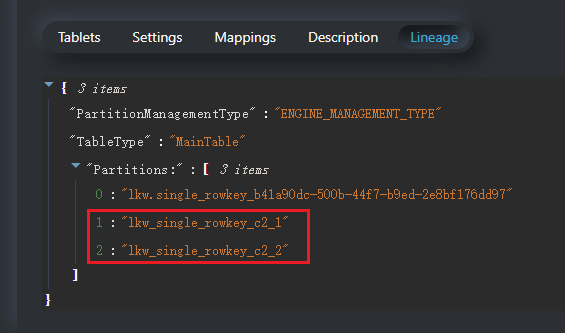
如果是分区表,需要手动添加分区,分区详情可以在shiva界面上查看。
alter table single_rk22 add partition (c2 = 1);
alter table single_rk22 add partition (c2 = 2);